Unified Inbox for LinkedIn and Email: The Multichannel Reply Desk Playbook
Your sequencer is pushing email across 450 mailboxes and HeyReach is running LinkedIn across 60 sender accounts. Replies from the same campaign, sometimes from the same person, are landing in two completely different systems, and the inbox manager has two browser windows open and no shared source of truth between them. A unified inbox for LinkedIn and email is the obvious fix, and it is where most teams stop.
They connect both channels into one stream, feel the relief of a single queue, and discover within a week that consolidating replies is the easy part. The hard part is deciding who owns a conversation that exists on two channels, which identity answers it, how fast, in what register, and what happens to the sequence on the other channel when it does. This is the playbook for that layer.
What a unified inbox for LinkedIn and email actually has to do
“One inbox” is a user interface claim. The operating requirement is five distinct jobs, and most unibox features only do the first one.
- Collapse. Every reply from every mailbox and every LinkedIn sender arrives in one sortable stream, labeled by client, campaign, and channel.
- Resolve identity. Recognize that the email thread from
[email protected]and the LinkedIn DM from Priya Raghavan are the same human in the same buying conversation. - Preserve sender identity. Answer from the exact mailbox or LinkedIn account that sent the original message, in that persona’s voice, never from a generic shared address.
- Apply channel-native rules. A LinkedIn DM and a cold email reply do not get the same answer. Length, links, formality, and urgency all differ.
- Close the loop. Push the outcome back out: pause the sequence on both channels, book the meeting on the right calendar, log the conversation to the CRM.
Grade any tool you are evaluating against those five, not against the screenshot. Job one is table stakes now. Jobs two through four are where multichannel reply management is actually won or lost.
The problem no unibox feature page solves: the same human on two channels
Multichannel outbound works because it is multichannel. You connect on LinkedIn, you email the work address, and the second touch lands on someone who already half recognizes the name. The cost of that design is that your prospect now has two open doors into your organization and no idea they lead to the same room.
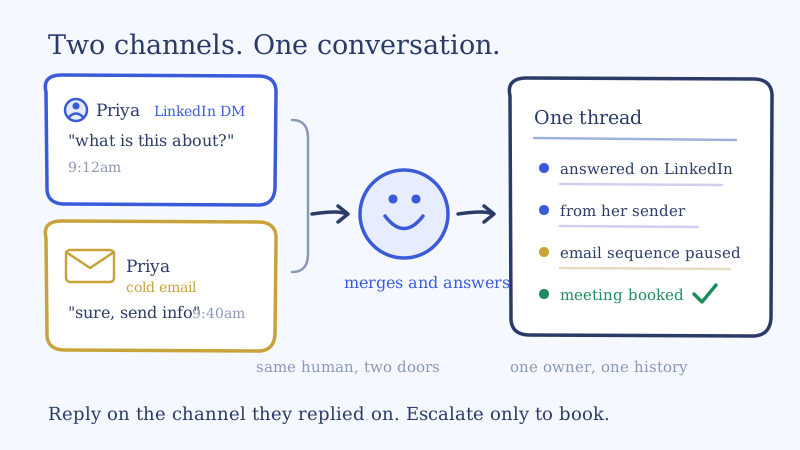
So you get the double reply. Priya accepts the connection request and sends “what is this about?” on LinkedIn at 9:12am. At 9:40am she gets to her inbox and replies to the email with “sure, send me some info.” Two systems, two queues, two inbox managers, and now a real chance she receives two different answers written by two different people under two different sender identities within the hour. That is not a near miss. That is the single fastest way to make coordinated outbound look like spam.
The sending side of this is largely solved, and the ecosystem solved it. HeyReach’s native Smartlead and Instantly integrations sync lead state in both directions, so a reply on either channel pauses outreach on both. That is exactly the right primitive and you should have it switched on. But notice what it does: it stops the robot from talking. It says nothing about who answers, from where, with what, and whether the two channels agree.
Pausing the sequence is hygiene. Answering the human is the job.
The channel ownership rule
Here is the rule we run, and it resolves the overwhelming majority of cross-channel cases without a meeting:
Reply on the channel the prospect replied on. Merge the thread internally. Escalate channels only to book.
Three parts, each load bearing.
Reply where they replied. The channel a prospect chooses tells you where their attention is and which identity they think they are talking to. If Priya answered on LinkedIn, she is expecting Priya-to-human, short, in the DM. Answering her cold email instead forces her to reconstruct who you are in a different context. Channel-switching the answer costs you the warmth you just earned.
Merge the thread internally. The conversation is one object in your reply desk even though it lives on two channels. One owner, one history, one set of facts already stated. The inbox manager answering the LinkedIn DM must be able to see that the email thread exists and what was said in it, or they will repeat a pitch she has already read.
Escalate channels only to book. The one legitimate reason to jump channels is the calendar. LinkedIn DMs are a poor container for a booking link, scheduling back and forth, and a calendar invite. When a LinkedIn conversation turns positive, the correct move is to ask for the work email and move the booking to email, explicitly and for a stated reason: “happy to send over a couple of times, what is the best email for a calendar invite?” That reads as competence, not as a channel dodge.
The exceptions worth hard-coding
| Situation | Correct channel | Why |
|---|---|---|
| Double reply within the same hour | The channel with the higher-intent message | Answer the better reply, acknowledge the other in one line so she knows it landed |
| Opt-out or “do not contact” on either channel | Suppress on both, confirm on the channel they used | Compliance is global to the person, not per channel |
| Reply from a different person at the same account | Email, and re-resolve the stakeholder | A forward or CC means the conversation now has multiple stakeholders |
| LinkedIn connection request accepted, no message | No reply, continue the sequence | Acceptance is not a reply, and treating it as one burns the opener |
| Positive LinkedIn reply, booking needed | Ask for email, book there | Keeps the calendar flow and the reminders in a channel built for it |
The “different person at the same account” case is the one that quietly leaks the most pipeline, because the conversation changes shape rather than just channel. We covered how to handle that specifically in multi-stakeholder threads with CCs and forwards.
Channel-native reply rules for LinkedIn versus email
A reply desk that writes the same message on both channels is not multichannel, it is email with a LinkedIn export. The differences are concrete enough to encode as rules.
| LinkedIn DM | Cold email reply | |
|---|---|---|
| Target length | 1 to 3 sentences | 3 to 6 sentences |
| Register | First person, conversational, no signature block | Professional, signature intact |
| Links | Avoid in the first reply, request email instead | Fine, including a booking link |
| Attachments | None, offer to email it | Expected for proposals and case studies |
| Latency decay | Minutes, it is a push notification on a phone | Hours, it sits in an inbox |
| Formatting | Plain text, no bullets | Bullets and structure help |
| Identity | Must come from the sending account, visibly a person | Must come from the sending mailbox |
The latency difference is the one operators underestimate. A LinkedIn DM fires a phone notification while the prospect is already in the app, which means a LinkedIn reply has a shorter half-life than an email reply to the same campaign. If you run one blanket SLA across both channels, you are systematically too slow on the channel that punishes slowness hardest. Set the LinkedIn SLA tighter than the email SLA. The reasoning behind per-category, per-channel clocks is the same logic we laid out in the cold email reply triage workflow, applied to a second channel.
Sender identity is the deliverable
On email, a wrong-mailbox reply is an annoyance. On LinkedIn it is a credibility event. The prospect is looking at a profile with a face, a headline, and a history while they read your message. If the voice does not match the profile, or the reply arrives from a different account than the connection request, the whole motion is exposed.
This has three operational consequences at agency scale.
Replies must route back to the originating account. Not a pool, not a shared desk, not the account manager’s personal profile. If sender 14 of 20 opened the conversation, sender 14 answers it. A unified inbox that cannot guarantee this is a reading tool, not a reply tool.
Each sender needs a persona, not just credentials. Twenty LinkedIn senders for one client are twenty people with different seniority and different plausible things to say. A junior SDR persona should not be writing commercial terms. Persona definition is the same discipline as brand voice, one level more granular, and it is worth doing properly for the same reasons we argue for training a reply agent on brand voice.
Client privacy is a hard boundary. When you run LinkedIn senders on behalf of clients, those accounts contain the client’s real personal conversations alongside your campaign threads. Your reply desk must show campaign conversations and nothing else. Getting this wrong is not a feature gap, it is a trust breach, and it is the fastest way to lose a retainer.
Setup walkthrough: wiring LinkedIn and email into one reply desk
Assume a sequencer handling email, HeyReach handling LinkedIn, and a reply desk in the middle.
- Connect both sides to the conversation layer. Attach every mailbox and every LinkedIn sender to the reply desk, tagged by client and campaign. Tagging at connect time is not optional. Untagged senders become unroutable replies the moment you pass a few hundred.
- Turn on cross-channel sending suppression. Switch on the native sequencer and LinkedIn integrations so a reply on either channel pauses both. Verify it with a live test on one contact before you trust it across a book.
- Define the identity key. Decide how the desk matches a LinkedIn profile to an email address: a shared lead ID from the sequencer, the enrichment record, or domain plus name. Whatever it is, it has to be deterministic, because this is the match that prevents double answers.
- Write the per-channel SLA and category matrix. Reply categories across both channels, each with an action, an owner, and a clock. Meeting-ready and opt-out get the tightest SLAs on both channels. LinkedIn gets a tighter clock than email in every category.
- Set the approval boundary per channel. Decide what sends autonomously and what queues for human approval. Most teams land on autonomous for scheduling, information requests, and routine qualification, with approval for pricing, commercial terms, and anything from a named target account.
- Close the loop to calendar and CRM. Booking lands on the right calendar, the conversation logs to the CRM against the right contact and client, and the outcome is attributed back to the originating channel so you can actually tell which channel produces meetings.
Step six is how you earn the right to the next conversation about budget. Without channel-level attribution on meetings booked, not replies received, you are guessing about where the LinkedIn spend is going.
The volume math that forces the decision
Substitute your own numbers, but run the arithmetic, because it is the argument.
A three-client agency. Per client: 150 mailboxes and 20 LinkedIn senders.
- Email. 150 mailboxes at 30 sends a day is 4,500 messages daily. At a 3% reply rate, roughly 135 replies a day per client.
- LinkedIn. 20 senders at 20 messages a day is 400 messages daily. LinkedIn reply rates run far higher than email because the message arrives in a low-volume, high-attention channel. At 15%, roughly 60 replies a day per client.
That is about 195 replies a day per client, so roughly 585 across the agency. Now cost the human version. A cross-channel reply done properly means opening the thread, checking whether the other channel has history, matching the sender persona, writing in the right register, and updating the record. Four minutes is a fair estimate and generous on the fast ones.
585 replies at four minutes is 2,340 minutes, which is 39 hours of focused reply work every single day. That is roughly five full-time inbox managers doing nothing but replies, with no slack for meetings, sick days, onboarding, or the client call that eats a Tuesday afternoon.
Then notice the harder constraint. Headcount buys you throughput, not latency. Replies do not arrive evenly, they cluster in the prospect’s morning across whatever timezones your lists span. A five-minute response target means the desk has to clear each reply at close to the speed it arrives, in bursts, which a queue worked by humans cannot do at any headcount you would be willing to pay for. We made the full case for why speed is the variable in how five-minute response times increase conversions.
This is the point where agencies either cap growth at their reply desk capacity or change the mechanism.
Where an AI inbox agent fits in the stack
Underfive is the conversation layer, not another sender. The sequencer keeps sending email, HeyReach keeps running LinkedIn, and Underfive’s AI inbox agents sit across both channels and do the reply work: read every reply, resolve it to the right conversation and the right prospect, answer from the originating mailbox or LinkedIn account in that persona’s voice, follow up when the prospect goes quiet, and book the meeting on the calendar. Nothing in your sending stack moves.
The design decisions above are the product. Channel-native drafting, reply-from-originating-sender routing, cross-channel thread merging, per-channel SLAs, and an approval boundary you set per category rather than per tool. For agencies, the client-scoped boundary is enforced rather than remembered, and the agency setup runs the whole book from one desk with per-client voice and per-client reporting. If you would rather not staff the desk at all, we also run it as a managed inbox service.
If you are already running LinkedIn through HeyReach, the HeyReach integration is the fastest path to a single reply desk. Connect the senders, connect the mailboxes, define the identity key and the SLA matrix, and the two-window problem goes away.
How to evaluate any multichannel reply desk
Five questions. Make the vendor answer them in a live account, not a deck.
- Show me a conversation where the same prospect replied on LinkedIn and email. Is it one thread or two?
- Which account sends the LinkedIn reply, and can you prove it is the one that opened the conversation?
- Can I set a different SLA for LinkedIn than for email, by reply category?
- When a prospect opts out on LinkedIn, what happens to their email sequence, and how fast?
- For agencies: show me what my team sees in a client’s LinkedIn account, and confirm what they cannot see.
Any tool that answers the first four well is a real conversation layer. Any tool that only answers the first one is a shared inbox with extra channels, and you will rebuild the rest yourself in spreadsheets and Slack.
Start with one client
Do not migrate the whole book. Take your highest-volume client, connect their mailboxes and LinkedIn senders to one reply desk, write the identity key and the per-channel SLA matrix, and run two weeks with approval on everything commercial. Measure meetings booked by originating channel, not replies received. Then expand.
You can set that up on Underfive today, or book a demo if you want us to run the desk for you while your team stays on strategy and client work.