Unified Inbox for Cold Email: What It Is, Why One Inbox Per Tool Breaks, and How to Evaluate One
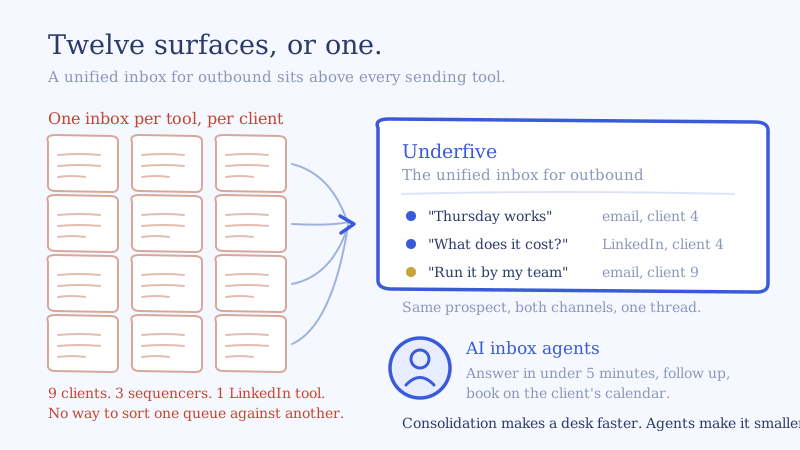
You run nine clients, about 1,800 mailboxes, three different sequencers because three different clients came with three different stacks, and one LinkedIn tool. Your inbox managers are not short on inboxes. They have twelve reply surfaces open, and the only thing holding the operation together is a person remembering which tab belongs to which client. Every one of those tools ships a reply view it calls a unified inbox for cold email, and not one of them can see the other eleven.
That is the whole problem with the term. It has been diluted into near-meaninglessness because every sequencer now has one. The distinction that matters is not whether a tool has a unified inbox. It is whether the inbox unifies across your tools or only within one of them. Those are different products solving different problems, and only one of them survives a multi-client, multi-sequencer operation.
This is the category definition, the failure mode, and the 10 criteria to score a unified inbox against before you sign anything.
What a unified inbox for cold email actually is
A unified inbox for cold email is a single conversation surface that collects every reply from every sending identity you operate, regardless of which tool sent the original message, and lets a team work those replies to an outcome without logging into the source tool.
Three clauses in that sentence do the work.
Every sending identity. Cold email at volume means mailbox rotation. The common operating convention is to keep each mailbox well under a hundred sends a day, which is why a client doing 1,500 sends daily needs dozens of mailboxes rather than one. The reply does not come back to a central address. It comes back to whichever of those dozens of mailboxes sent it. Consolidation is not a convenience feature here, it is the only way the replies are readable at all.
Regardless of which tool sent it. This is the clause almost every product on the market quietly drops. A sequencer’s inbox unifies the mailboxes that sequencer controls. That is a real and useful thing, and for a team running one tool it is sufficient. It is also structurally incapable of showing you the LinkedIn reply from the same prospect, or the reply from the client you run on a different platform.
To an outcome. A surface that shows you replies is a reading tool. The job is not reading. The job is that a prospect who said “what does this cost” at 9:14pm has an answer before they lose interest, and a calendar invite before they talk to someone else. An inbox that stops at display has moved the work, not reduced it.
Put those together and the category has a cleaner name than “unified inbox.” It is a conversation layer: the place in the outbound stack where sending ends and converting begins.
Why one inbox per tool breaks at scale
Here is the arithmetic that nobody running three mailboxes ever hits.
Take the agency above. Three sequencers plus one LinkedIn tool reads like four inboxes. It is not four, because every one of those tools partitions by client as well as by tool. Four clients on sequencer A are four separate workspaces, each with its own inbox. Three on sequencer B, three more. Two on sequencer C, two more. The LinkedIn tool, three more. That is twelve reply surfaces for nine clients, and the number grows with every client you sign and every platform a new client brings with them.
Four specific things break, in this order.
Triage stops being possible. An inbox manager cannot prioritize across twelve queues. They can only round-robin them. The consequence is that a hot “can you do Thursday” reply in surface nine waits behind forty out-of-office autoresponses in surface two. Priority requires a single sorted list, and twelve lists cannot be sorted against each other by a human switching tabs.
Speed collapses, invisibly. Every tool has its own notification path, its own sync interval, and its own tab. The real cost is not the sync lag, it is the context switch. Median time to first reply degrades into the hours and nobody can see it happening, because no single tool holds the data to measure it. We went through the conversion cost of slow response times separately, and it is the most expensive invisible leak in outbound.
Cross-channel context is lost. A prospect replies to a LinkedIn message on Tuesday and to an email on Thursday. In a per-tool world those are two strangers to two different systems, and often two different people answer them. The prospect experiences an organization that does not know who they are.
Multi-client governance gets informal. With twelve surfaces, “who answered the Henderson account’s replies last Friday and what did they say” becomes an archaeology project. For an agency, that is not an inconvenience. That is the quarterly review you cannot evidence.
None of this is a criticism of the sequencers. A sequencer is built to send, and its inbox is built to serve its own sending. The structural problem is that your operation spans tools and the inbox does not. Once the surfaces are collapsed into one, the five-stage workflow for managing replies at scale is what you run on top of it.
Unified inbox for outbound vs your sequencer’s inbox
The honest division of labor, stated plainly:
| Sequencer’s built-in inbox | Unified inbox for outbound | |
|---|---|---|
| Scope | Mailboxes that one tool controls | Every mailbox and LinkedIn account across every tool |
| Channels | Email, within that platform | Email and LinkedIn in one stream |
| Client model | One inbox per workspace | One desk, partitioned by client |
| Best for | Teams standardized on a single tool | Multi-tool, multi-client, multi-channel operations |
| Job it ends on | Showing you the reply | Answering it and booking the meeting |
If you run one sequencer, one client, and one channel, your sequencer’s inbox is the right tool and you should not buy anything. The moment you add a second sending platform, a second channel, or the fifth client, the inbox stops being a feature of a sending tool and becomes a layer of its own.
The 10 criteria for evaluating a unified inbox for cold email
Most evaluations get run on the demo, which means they get run on the thing that demos well: the look of the consolidated stream. Everything that actually fails at 2,000 mailboxes fails somewhere else. Score candidates on these ten, weighted for your operation.
1. Source coverage, and whether it is native
Ask which sequencers and LinkedIn tools are supported natively versus “available by webhook.” Native means the vendor maintains the connection and threading works without you building anything. Webhook-only means you own an integration project and the maintenance of it forever. Check your current stack and the two platforms your next two clients are most likely to arrive with. The right shape to compare against is coverage on both sides of the stack, a native email sequencer connection like Smartlead and a native LinkedIn connection like HeyReach, rather than one or the other.
2. Sender identity fidelity
When your team answers from the unified inbox, does the reply leave from the exact mailbox that sent the original message, inside the original thread? Or does it leave from a shared address the vendor owns?
This is the single most common dealbreaker and the easiest to miss on a demo. A reply that arrives from a different address tells the prospect they are in an automated funnel, and it moves the conversation off the warmed domain the thread started on. Test it live, from two different mailboxes, and read the raw headers.
3. Client partitioning that is structural, not cosmetic
A filter labeled “client” is cosmetic. What you need is partitioning that survives a new hire’s first week: separate workspaces, per-client permissions, playbooks and calendars that cannot be applied to the wrong account, and no path by which a reply drafted for one client can be sent under another’s identity. Ask what specifically prevents that, and do not accept “the UI makes it obvious.”
4. Identity resolution across channels
Does the system recognize that the email thread and the LinkedIn conversation are the same human in the same buying cycle? If it does not, you have a unified inbox with two of everything in it, which is a sorted list rather than a conversation layer. This is the hardest thing on the list to build and the easiest to verify: send yourself a reply on both channels and see whether they merge. The multichannel reply desk playbook covers what to do with the merged thread once you have it.
5. Classification quality, and what happens when it is unsure
Every vendor claims reply classification. The useful questions are narrower. How many categories, and are they ones you can act on differently? Is a confidence level exposed? And critically: where does an uncertain reply go? A system that silently guesses on a novel objection is worse than one that routes it to a human queue and tells you why.
6. Whether it acts or only displays
This is the line between a shared inbox and a conversation layer. Can the system draft the reply, send it under the right identity, negotiate a time, put the meeting on the correct client calendar, and own the fourth follow-up eleven weeks later? AI inbox agents are what make the difference between cutting the cost per reply and cutting the number of replies a human has to touch. Only one of those changes your headcount math.
7. Bidirectional write-back
Replies have consequences in the source tool, and they have to flow back. When a reply is classified as an opt-out or a hard no, the sequence must suppress in the sequencer, not just close in the inbox. When a meeting books, the sequence must pause on both channels. When a conversation ends, it should be in the CRM.
One-directional sync is where compliance problems come from. A polite “please remove me” that closes in your inbox while the sequence keeps sending is a complaint waiting to happen.
8. Speed architecture
Do not ask “is it fast.” Ask what triggers the handling: a webhook on arrival, or a poll on an interval. Then ask the vendor for median time to first reply across their book of business, and insist on median rather than average, because a handful of overnight outliers will flatter an average badly.
Under five minutes is the right target. It is only achievable if the architecture fires on arrival and the answering does not wait on a human being awake.
9. The shape of the pricing, not the number
Per seat pricing punishes you for staffing a reply desk. Per mailbox pricing punishes you for the mailbox rotation that cold email requires, and it scales with the wrong variable, because mailbox count tracks sending volume and your cost of work tracks replies. Per reply pricing scales with the thing you actually consume.
Model your real numbers across all three shapes at your current volume and at twice your current volume. Our pricing is per reply for exactly this reason: 1,800 mailboxes and 1,800 replies are very different amounts of work, and only one of them should cost you money.
10. Auditability
Per client, per week, can you produce median time to first reply, positive reply rate, reply-to-meeting rate, and the share of replies that needed a human? Can you show a client the full history of a conversation, including what was sent and by whom?
For an agency this is not reporting hygiene. It is the evidence base for the renewal conversation, and it is the one criterion that is nearly impossible to retrofit once you have chosen wrong.
A worked example: nine clients, 1,800 mailboxes, twelve surfaces
Use the agency from the opening and put numbers on it. These are assumptions, stated so you can swap in your own.
Assume 1,800 mailboxes averaging 40 sends a day, so roughly 72,000 sends daily. Assume a combined reply rate of 4 percent including every autoresponse, bounce and out of office, so about 2,900 replies a day. Assume a fifth of those are genuine human replies that require a decision or an answer, call it 580.
At four minutes of real handle time per reply, which is generous once you include reading the thread, checking the client playbook, and writing something that sounds like the sender, 580 replies is roughly 39 hours of work a day. Across twelve surfaces with the context switching that implies, call it meaningfully more. We broke down what one inbox manager can actually absorb and the ceiling binds well before this.
Consolidating the twelve surfaces into one gets you a real but bounded win. Say it cuts handle time per reply from four minutes to two and a half by removing the tab hunting and the client-context reload. That is 39 hours down to 24. Worth doing. It does not change the fact that you need a reply desk the size of a small department, because consolidation changes the cost per reply and not the count.
The count only moves when the system answers. If the straightforward categories get handled under five minutes without a human, and the pricing questions, the novel objections and the uncategorized replies route to an approval queue, the human queue drops to a few dozen judgment calls a day. That is one person doing skilled work instead of five people doing triage, and it is the entire reason the conversation layer is a category rather than a feature.
How to run a two-week evaluation
Do not pilot across nine clients. Pilot in a way that produces a decision.
- Connect one client, on your messiest platform. The one with the oldest integration and the most mailboxes. If it works there, it works everywhere.
- Add the LinkedIn tool for that same client. The cross-channel merge is where most candidates quietly fail, and you want to find out in week one.
- Set everything to approval. Nothing sends without a human reading it. You are evaluating draft quality, not risk appetite.
- Read every draft for the first 200 replies. This is non-negotiable and it is the whole evaluation. Two hundred replies will surface every way your playbook is wrong, and no amount of configuration up front will substitute for it.
- Measure the four numbers before and after. Median time to first reply, positive reply rate, reply-to-meeting rate, approval queue share. If median time to first reply does not move, the architecture is polling and you have your answer.
- Then widen one category at a time. Start with the replies where a wrong answer costs nothing, and promote a category to auto-send only after you have read a hundred of its drafts.
Two weeks of that tells you more than any vendor comparison, including this one.
Where this leaves you
A unified inbox for cold email is worth buying when your operation spans more tools, channels or clients than any one sequencer can see. It is worth buying as a layer rather than a feature, because the layer is the only thing positioned to resolve identity across channels, partition by client, and write outcomes back into every sending tool you run.
And it is only worth the money if it answers. Consolidation makes a reply desk faster. Agents make it smaller.
If you are running more than one sequencer or more than five clients, start with one client on the unified inbox, keep every category on approval, and read the first 200 drafts. If you are onboarding clients faster than you can write playbooks, the managed reply desk for agencies exists for that case: we build and run the conversation layer across your existing stack. Either way the sequencers keep sending. They just stop being where your replies go to wait.