HeyReach Reply Management: Running a LinkedIn and Email Reply Desk at Agency Scale
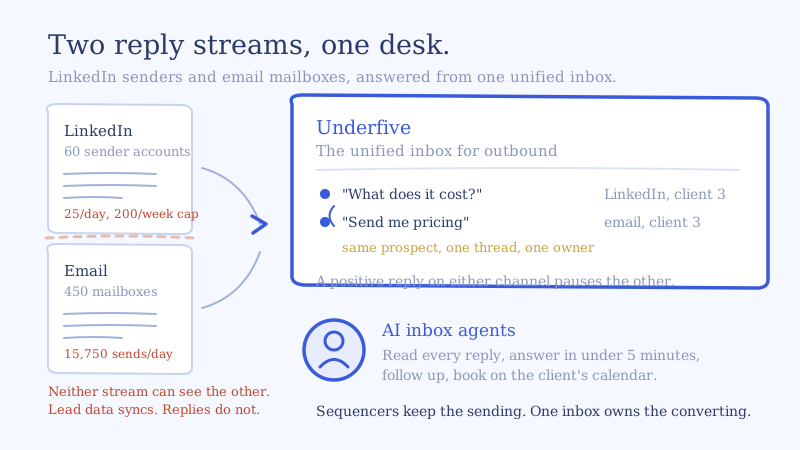
You are running 60 LinkedIn sender accounts in HeyReach across six clients and another 450 email mailboxes in a sequencer, and the two reply streams never meet. HeyReach reply management works fine inside HeyReach, which is exactly the problem: your inbox manager has the unibox open in one window, the sequencer’s inbox in another, and no way to know that the person who just said “send me pricing” on LinkedIn is on step four of an email sequence saying the same thing in a different voice.
This is the operator playbook for that desk. What HeyReach’s unibox genuinely does, the one configuration setting that silently hides replies from your team, how LinkedIn’s sender limits make reply volume lumpy in a way email never is, and how to run both channels as a single queue without taking sending away from the tools that are good at it.
What HeyReach’s unibox does, and where reply management stops
Give the unibox credit. It is a real three-pane inbox, not an afterthought: conversation list with filters, message center, and a lead panel with tags and email on the right. Per HeyReach’s own documentation it filters by sender, campaign, tags and auto-tags, message type (LinkedIn, Sales Navigator, Recruiter), whether the last message came from you or the lead, and archived state. You can send attachments, images and voice notes from desktop, reply on behalf of a teammate without switching profiles, and run bulk actions across conversations to tag, add to lists, or export.
The agency plumbing is there too. Each client gets a workspace with isolated accounts, campaigns and inbox, whitelabel is available on the agency tiers, and billing is per connected LinkedIn sender rather than per seat, so putting your whole reply team in the tool costs nothing extra. Since May 2026 every reply also gets automatic sentiment classification into Interested, Generic or Negative, on by default.
So what is missing is not inbox quality. It is scope and layer.
Scope. HeyReach is LinkedIn. There is no native email channel, which is the correct design decision for a LinkedIn-first product and the reason the integrations list includes email sequencers rather than competing with them. But it means the unibox can never be the place your team works, because most of your reply volume is email.
Layer. A unibox is a viewing surface. A reply desk needs an operating layer on top of it: assignment, an answer-in-under-five-minutes SLA, follow-up when the prospect goes quiet, approval rules that differ by reply category, and a booking step that lands on the right client’s calendar. HeyReach surfaces the conversation. Something has to convert it. That distinction is the whole reason the unified inbox for outbound exists as a category separate from the tools that send.
The HeyReach reply management setting most agencies get wrong
Before anything else, go audit inbox privacy. It is configured per LinkedIn account, and it is the single most common cause of “replies are missing from the inbox.”
Two options. Keep it private tracks only conversations that started from a HeyReach campaign. Sync full inbox imports the last 30 days of that account’s LinkedIn history and then tracks every future conversation, campaign or organic.
Three consequences that bite at scale:
- Private mode hides warm inbound. A prospect who saw the client’s post and messaged them directly is invisible to your desk. On client-owned profiles that is often the highest-intent conversation of the week.
- Full sync is retroactive by 30 days only. If you connect an account today, anything older is not coming in. Connect accounts before a campaign launches, not after.
- Only the person who connected the account can change the setting. If a contractor connected a client’s profile in March and is no longer on the team, nobody can flip it. You have to reconnect the account, which means the person who reconnects it owns that setting going forward. Document who connected what.
Our default: full sync on agency-owned personas, because you own the profile and every conversation on it is business. For client-owned executive profiles, ask first, then usually full sync anyway, because the organic DMs are where the pipeline is. Private mode is for the rare client who treats their LinkedIn inbox as personal.
Why LinkedIn reply management breaks differently than email
Email reply volume is smooth. You pick sends per mailbox per day, multiply by mailbox count, and the replies arrive in rough proportion. LinkedIn does not behave that way, and staffing a desk as if it does is why LinkedIn conversations sit unanswered for a day while email gets answered in ten minutes.
Sender limits are the throttle, and they are hard. HeyReach’s documentation puts the configurable ceiling at 40 connection requests per day, recommends 25 per day after warm-up, allows up to 30 for accounts with more than 1,000 connections and strong acceptance, and enforces a hard cap of 200 connection requests per sender per week. LinkedIn’s own weekly allowance is not published and is set dynamically per account.
Limits are per account, not per campaign. If a sender is running in three campaigns, those campaigns share one daily allowance. Your per-campaign reply forecasts will be wrong. Forecast and staff by sender pool.
Cooldown Mode pauses the sender, not the campaign. When a sender exceeds its weekly allowance, HeyReach parks its connection requests until the Monday reset. There are also invisible locks that delay requests by a couple of hours when LinkedIn pushes back. The practical effect is that outbound volume is front-loaded into the first half of the week and replies arrive in a lumpy tail that peaks when your desk has already moved on.
The reply itself costs more handle time than an email reply. A LinkedIn message has no subject line, no signature, no quoted thread, and frequently no context beyond six words. The operator has to open the profile to remember who this is. And the answer has a different shape: shorter, no formal sign-off, and if it goes out as an InMail it lives inside LinkedIn’s limits of 200 characters of subject and 1,900 characters of body. A playbook written for email produces replies that read wrong on LinkedIn.
The reply math on 60 HeyReach senders and 450 mailboxes
Run your own rates through this. The inputs below are an illustrative set for one mid-size agency book, not a benchmark, and the point is the shape rather than the numbers.
Assume 60 LinkedIn senders at 25 connection requests a day, five days a week. That is 1,500 invites a day and 7,500 a week, comfortably inside the 200 per sender weekly cap. Assume 450 email mailboxes at 35 sends a day, so 15,750 emails a day.
Now apply your own rates. Say 30 percent of invites accept and one in five accepted connections eventually sends a message. That is 90 LinkedIn conversations a day. Say email replies at 4 percent of sends, which gives 630 email replies a day, most of which are not worth a human.
So the desk sees roughly 720 conversations a day across two channels. LinkedIn is 12 percent of the volume and a much larger share of the intent, because someone who accepted a connection and typed a sentence is further along than someone who typed “not interested” into an email autoresponder.
Here is the number that decides whether you hire. At four minutes per reply, which is realistic once you include reading the thread, checking the client’s playbook, drafting and sending, 720 replies is 2,880 minutes of handle time. That is 48 hours a day. Across a 10-hour working window at honest utilization you need seven or eight people to clear it, and you need them distributed across a tail that peaks Tuesday and Wednesday because of how the sender limits allocate volume.
That is the arithmetic that breaks reply desks. We worked through the email-only version of it in how many mailboxes one inbox manager can actually handle, and adding LinkedIn makes it worse, not better, because the per-reply handle time is higher.
Do HeyReach replies sync back to your email sequencer?
This is the question operators actually search for, and the honest answer is: lead data moves, replies do not.
HeyReach integrates natively with Instantly, Smartlead and Email Bison, and the documented direction of travel is lead-level. A sequencer event, for example an email reply or a link click, can push a lead into a HeyReach campaign or list. That is a genuinely useful handoff and it is what the integration guides describe.
What is not documented is the reverse: LinkedIn replies appearing in your sequencer’s inbox, or a reply on one channel automatically pausing the sequence on the other. Treat cross-channel pausing as manual unless you build it. Which means that today, in most multichannel setups, a prospect who says “we just signed a contract, try me in Q3” on LinkedIn keeps receiving email steps two, three and four. That is not a HeyReach failure. No sending tool can pause a sequence it cannot see.
Two ways to close it. Build it yourself on webhooks and the API, or put a conversation layer above both tools that owns the reply state for the prospect rather than for the channel. The second is what a unified inbox for LinkedIn and email is for.
Wiring HeyReach reply management into a unified inbox
The division of labor to aim for: HeyReach owns LinkedIn sending and sender health, your sequencer owns email sending and deliverability, and one inbox above both owns every reply and every outcome. Here is the setup.
Step 1: Connect each HeyReach workspace as its own client space
One workspace per client, one API key per workspace, one client space in the unified inbox. Client isolation has to survive the consolidation, because the moment client A’s reply history is searchable from client B’s view you have a contractual problem, not a workflow problem. The HeyReach integration connects per workspace for exactly this reason, and the same pattern applies to each sequencer workspace you connect alongside it.
Step 2: Set inbox privacy deliberately, before launch
Go account by account using the rules above. Record who connected each account, because that person is the only one who can change the setting later.
Step 3: Subscribe to every reply, not the first
HeyReach’s webhooks cover MESSAGE_REPLY_RECEIVED and INMAIL_REPLY_RECEIVED, and as of 2026 there is an event for every message in a thread rather than only the first reply. Use it. The first reply is usually “sure, what is this about.” The negotiation, the objection and the scheduling all happen in messages three through six, and a desk wired only to first-reply events goes silent at exactly the moment the conversation is worth money. The payload carries the conversation ID, which is what you use to pull the full thread before answering. Webhooks retry five times within 24 hours, so build your endpoint to be idempotent on conversation ID plus message timestamp.
Step 4: Keep the auto-tags, add your own routing layer
HeyReach’s automatic Interested, Generic and Negative tags are a useful first-pass signal and they are not editable, so do not try to bend them into a routing taxonomy. Use them as an input. Your own tags carry the routing decision: which client, which playbook, which approval rule, whether it is a multi-stakeholder thread. A four-state intent tag plus a client tag plus an owner is enough. More than that and nobody maintains it.
Step 5: Write a channel-aware playbook, not two playbooks
Same offer, same qualification criteria, same calendar. Different register. LinkedIn replies should run short, drop the signature, drop the subject-line thinking, and respect the InMail ceiling if the thread is an InMail. Email replies can carry a case study link and a longer frame. Give the AI inbox agent one playbook per client with channel-specific length and tone instructions, so the positioning stays identical and only the shape changes.
Step 6: Auto-send the easy categories, hold the rest
Scheduling requests, availability confirmations, out-of-office handling, unsubscribe and polite declines are safe to auto-send once you have read a hundred of them. Pricing, security questionnaires, competitor mentions and anything from a named account go to approval. The point of the approval queue is not safety theatre, it is that reading it tells you which playbook gaps to fix next.
Step 7: Reply from the original sender, and pause the other channel
Answers go out from the LinkedIn account that sent the original message, never from a central profile, because a stranger entering the thread kills it. And the moment a prospect replies positively on either channel, pause the other. One prospect, one conversation, one owner, regardless of how many tools are involved.
Multi-client hygiene for a HeyReach reply desk
Three things go wrong on multi-client desks and all three are preventable.
Shared playbooks. Six clients do not have one objection-handling script. They have six, and the difference is the whole value of the retainer. Build one per client even if the first draft is a copy.
Calendar misrouting. Every client needs its own booking destination and its own qualification floor. A meeting booked onto the wrong calendar is worse than a meeting not booked, because now the client has seen you be sloppy with their prospect.
Escalation ambiguity. Define per client who gets pinged, on what, and how fast. A security questionnaire from an enterprise logo and a “what does it cost” from a 10-person startup are not the same escalation, and the desk should not have to guess at 6pm on a Friday.
The four numbers a HeyReach reply desk runs on
Track these per client and split by channel, because LinkedIn and email will diverge.
- Median time to first reply. Not average. Average hides the overnight tail, and the overnight tail is where the losses are. Speed is the single highest-leverage variable in reply handling, and it is the first thing that regresses when volume climbs.
- Positive reply rate. Positive replies over total replies, by channel. This tells you whether the targeting and copy are working, independent of whether the desk is working.
- Reply-to-meeting rate. Of positive replies, how many reach a calendar. This isolates reply handling quality and it is the number that moves most when you fix speed and follow-up.
- Approval queue share. The percentage of replies that needed a human. Falling month over month means the playbook is maturing. Flat means you are using approval as a crutch.
The test is what the monthly client call sounds like. If it is still “we sent 7,500 connection requests,” you are reporting activity. Once you can say what share of their replies got answered inside five minutes and what share of positives reached a calendar, with your own measured numbers behind it, you are selling a different product.
Self-serve or managed
If you have an ops person who will own one playbook per client and read the first 200 replies, do this yourself. It is a workspace connection per client, a webhook, and an afternoon of playbook work, and the LinkedIn side is the easier half because the volume is lower and the intent is higher.
If you are onboarding clients faster than you can write playbooks, the managed option exists for that: we build and run the reply desk across your HeyReach workspaces and your email sequencers together, with inbox agents built for agency scale.
Either way the right starting move is the same. Connect one HeyReach workspace and the sequencer that runs alongside it, keep everything on approval, and watch one queue for a week. You will find out quickly whether your HeyReach reply management problem is a headcount problem or a layering problem. It is almost always the second one.