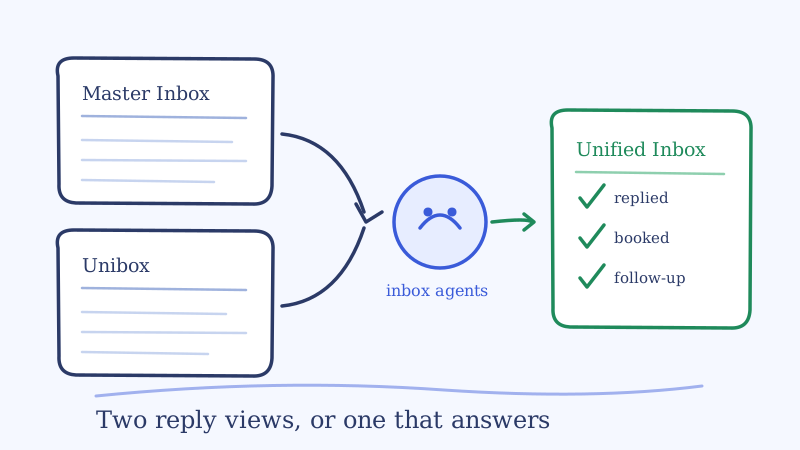
You are choosing between two cold email platforms, and the part you will actually live in all day is the reply view. Every Smartlead vs Instantly comparison online ranks them on sending volume, warmup, and price per seat, then treats the inbox as a footnote. That is backwards. Sending is the part you configure once a quarter. The reply view is the part your team opens two hundred times a week.
So this is a narrower comparison on purpose: Smartlead Master Inbox vs Instantly Unibox, judged only on what happens after a prospect answers. Where each one is genuinely better, where both hit the same wall, and what to do if you already run campaigns in both.
What each reply view is actually built for
Both tools solve the same first problem. When you send cold email from thirty mailboxes, you cannot log into thirty mailboxes to read replies. Smartlead’s Master Inbox and Instantly’s Unibox both aggregate replies from every connected sending account into one list, tagged by campaign and mailbox. That shared idea is where the similarity ends, because the two were designed around different users.
Instantly’s Unibox is designed for a person. It is lighter, faster to scan, and it auto-labels replies by sentiment so positive answers float up without you building anything. If you are a founder or a single rep working your own campaigns, the Unibox is the more pleasant place to sit. You open it, you see who is interested, you reply.
Smartlead’s Master Inbox is designed for an operation. Custom reply categories, workspace filters so an agency can view one client at a time, team assignment, and webhooks that fire the reply out to Slack, HubSpot, or Salesforce. It takes configuration before it feels good, and it rewards that configuration once more than one person is working the queue.
That difference explains most of the opinions you will find in Reddit threads and review posts. People reviewing it as a solo operator prefer the Unibox. People reviewing it as an agency or a team prefer the Master Inbox. Both are right about their own situation.
Smartlead Master Inbox vs Instantly Unibox, side by side
| Criterion | Smartlead Master Inbox | Instantly Unibox |
|---|---|---|
| Scan speed for one person | Denser, more filters to learn | Lighter and quicker to read |
| Reply classification | Custom categories you define | AI sentiment labels out of the box |
| Many mailboxes | Holds up well, filters are the point | Fine at small scale, noisier as accounts pile up |
| Agency or multi-client | Workspace filters make this workable | Weaker, built around one account’s campaigns |
| Team workflow | Assignment and ownership built in | Thinner, assumes one operator |
| Pushing replies out | Webhooks to Slack and CRM | Native integrations plus a light CRM |
| Deal tracking | Expects your CRM to own it | Built-in pipeline for simple setups |
| Replies to other tools | None, Smartlead campaigns only | None, Instantly campaigns only |
| Who writes the reply | You do | You do |
Read the last two rows again, because they are the ones the ranking comparisons skip and they matter more than everything above them.
The two limits both of them share
Neither one is actually unified. The word “unified” in both products means unified across mailboxes inside that product. If you run email in Smartlead, LinkedIn in HeyReach, and a second client’s campaigns in Instantly, you do not have one inbox. You have three inboxes and a habit of forgetting one of them. For an agency running a handful of clients across a handful of tools, the number of reply views to check every morning is tools multiplied by workspaces, and that number only goes up.
This is a structural limit, not a feature gap either vendor will close. A sequencer’s inbox is a convenience layer over its own sending infrastructure. It has no reason to ingest a competitor’s replies, and it never will.
Neither one replies for you. This is the bigger one. Both views are extremely good at telling you a prospect answered. Neither writes the answer. The reply still waits for a human to read it, decide what it means, write something useful, and send it. Everything the inbox does well, the labels, the filters, the assignment, is in service of getting a human to that message faster. The human is still the bottleneck, and the bottleneck has working hours.
That matters because reply value decays fast. A prospect who writes “what does pricing look like?” at 9pm is engaged at 9pm. By the time a rep opens the Unibox at 9:15 the next morning, the same person has moved on to a different week. We put the numbers behind that decay in how 5-minute response times increase conversions, and it is the reason a perfectly organized inbox can still leak pipeline. Organization is not response.
So which one should you pick?
Pick on your own shape, not on a feature count.
Choose Instantly’s Unibox if one or two people work all the replies, you send from under roughly twenty-five mailboxes, you do not need your own reply taxonomy, and a simple built-in pipeline is enough deal tracking. The lighter view is a real advantage when the person reading it is you.
Choose Smartlead’s Master Inbox if more than one person works the queue, you run multiple clients or brands, you want reply categories that match your own playbook, or you need replies webhooked into Slack and a real CRM. The setup cost pays back the first time two people stop stepping on the same thread.
If you are already live in one, the inbox alone is rarely worth a migration. Both views are good enough that switching platforms for the reply screen means re-doing domains, warmup, and campaign structure to fix a problem that sits one layer up. Fix the layer instead.
The option neither comparison mentions
There is a third shape that most of these comparison posts miss, because it is not a sequencer and so it never shows up in a sequencer bake-off: put a reply layer above whichever tools you already use.
That is what Underfive is. It is a Unified Inbox that ingests replies from Smartlead, Instantly, Email Bison, HeyReach, Aimfox, Expandi, PlusVibe, and Gmail into one view, and it runs AI inbox agents inside that view that read each reply, classify the intent, and send a human-like response from the original sender in under five minutes. Replies go back out through the same tool and the same mailbox they arrived on, so deliverability and thread history stay intact.
Two things change when the reply layer sits above the sequencer instead of inside it.
The first is that “unified” becomes literal. One view covers every tool and every client workspace, including LinkedIn, so the morning routine stops being a tour of six tabs. Agencies feel this hardest, which is why we wrote it up separately in how AI reply agents let agencies manage multiple client inboxes.
The second is that the inbox stops being a to-do list. Each reply category is either auto-send or require-approval, so routine answers like pricing questions, “send me more info,” and scheduling go out in minutes while the ones you flagged wait in an approval queue you can clear from the app or from Slack. Your reps stop drafting the same six replies and start showing up only where judgment is needed. The category design is the real work there, and we broke down a practical taxonomy in cold email reply categories and a triage workflow.
It keeps your sequencer, too. Smartlead and Instantly stay exactly where they are, doing sending, warmup, and deliverability, with a direct Smartlead connection and the same for Instantly. You are not replacing the tool you just finished comparing. You are answering the question the comparison does not cover: who writes the reply.
One thing to fix before any of this helps
Whichever inbox you end up in, its signal quality depends on the list that fed it. A reply view clogged with bounces, auto-responders, and dead catch-all addresses makes every triage decision slower and makes your reply rate look worse than it is. Validating the list before the campaign goes out, with something like Scrubby, is the cheapest way to make the inbox you chose actually readable. A clean list is also the difference between a reply rate you can learn from and one that just measures your data hygiene.
If the problem you are really trying to solve is volume rather than tooling, that is a different question, and we worked through it in how to manage cold email replies at scale.
The honest verdict
Instantly’s Unibox is the nicer single-operator reply view. Smartlead’s Master Inbox is the better team and agency reply view. Neither is a reason to leave the other, and neither one answers a prospect.
So before you pick, count how many reply views your team opens each morning and how long the average warm reply waits for a human. If the first number is above one or the second is above an hour, the choice between Master Inbox and Unibox is not the decision that will change your pipeline. The layer above them is.
A reasonable next step is to pick your busiest campaign, log the last twenty replies with timestamps, and measure the real gap between arrival and answer. That single number tells you whether you need a better inbox or a faster one.