Email Bison Reply Management: The Agency Playbook for Answering Every Reply in Under Five Minutes
You run 22 clients on Email Bison, roughly 2,400 sending accounts across isolated workspaces, and the sending half of the machine is in good shape. Email Bison reply management is where the operation leaks: Email Bison’s built-in inbox shows you every reply in real time, and that is exactly the problem, because seeing 900 replies a day is not the same as answering them.
This is the playbook for the second half. It covers what Email Bison’s built-in inbox is genuinely built to do, where a multi-client reply desk breaks, how to wire the reply layer per workspace, and which reply categories you should let an agent close without a human looking.
What Email Bison’s inbox is built for, and what it is not
Email Bison ships a natively built email client with a unified inbox that syncs replies across every connected sending account in real time, with full composing, attachments, one-off sends, webhook events and an API behind it. For a sequencer, that is a strong reply surface. You never log into 2,400 Gmail and Outlook accounts, and you never lose the thread context.
What it is, precisely, is a reading surface. It consolidates. It does not decide, draft, negotiate a time, or write the fourth follow-up to a prospect who said “circle back in Q1” eleven weeks ago. Those are human actions, and a unified inbox makes them faster without making them fewer.
That distinction is the whole of your capacity problem. Consolidation cuts the cost per reply, maybe from 90 seconds of context switching down to 40 seconds of actual work. It does nothing to the number of replies. When you add client 23, the reading stays easy and the answering does not.
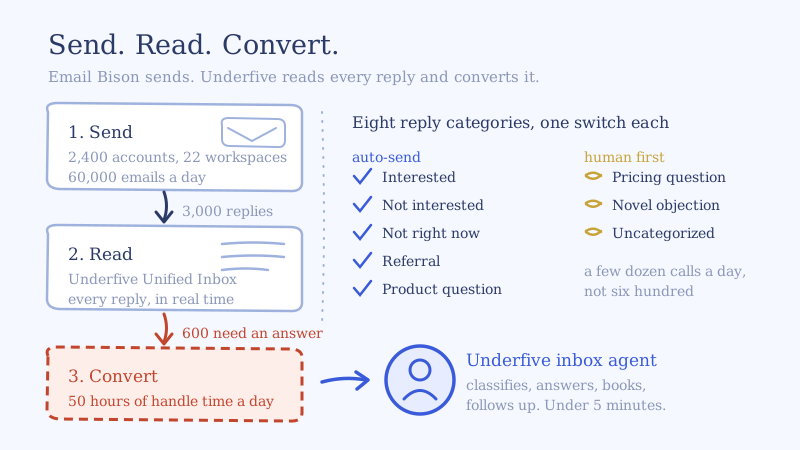
So the honest framing of Email Bison reply management at scale is three layers, not one:
| Layer | Job | Owns it |
|---|---|---|
| Send | Infrastructure, warmup, sequencing, per-client isolation | Email Bison |
| Read | One view of every reply across every sending account and every client | Underfive Unified Inbox |
| Convert | Classify, answer in minutes, handle objections, book, follow up | Underfive inbox agents, or your own reply desk |
Most agencies staff layer three with people and then wonder why reply quality falls off a cliff at 1,500 mailboxes. The layer is real work, it scales linearly with send volume, and headcount is the most expensive way to buy it.
The reply math on 2,400 Email Bison sending accounts
Run your own numbers before you decide anything. Four inputs, all visible in Email Bison.
Take the 22-client agency above. 2,400 live sending accounts, 25 sends per account per day on 2026 deliverability settings, a 5 percent total reply rate counting everything that lands in the inbox:
- Daily sends: 2,400 x 25 = 60,000
- Daily replies: 60,000 x 0.05 = 3,000
That number shocks people, so split it the way the inbox actually splits. In cold outbound, the large majority of what hits a unified inbox is not a conversation: out of office, autoresponders, bounces that landed as replies, “remove me”, “who is this”, wrong-person forwards. Call it 80 percent noise and 20 percent genuine human engagement. That leaves 600 replies a day that need a real written answer, and of those maybe 12 to 18 percent are positive or curious enough to be worth a meeting attempt.
Now price it. At a genuinely fast five minutes per substantive reply, 600 replies is 3,000 minutes, or 50 hours of handle time per working day. That is six to seven full-time inbox managers doing nothing but replying, before a single one of them takes a vacation, misreads a client’s offer, or answers a pricing question at 9pm.
The trap is that the average does not bind you. Replies arrive in a peak that tracks your send windows, so something close to half the day’s volume lands in a three-hour band. Staff to the average and your five-minute SLA quietly becomes a four-hour SLA exactly when the hottest replies come in. We walked through why that peak, not the daily total, caps your desk in how many mailboxes per inbox manager you can actually run.
Wiring Email Bison reply management with an AI inbox agent
The fix is not a bigger desk. It is putting an agent on layer three and keeping humans on the judgment calls. Here is the setup, workspace by workspace.
Step 1: Connect each Email Bison workspace with its own API key
Email Bison gives every agency client an isolated workspace with its own tags, variables, webhooks and sending accounts. That isolation is the right architecture, and it means the reply layer connects per workspace, not once for the whole agency.
Pull the API key from that workspace’s Developer API settings and paste it into the Integrations section of Underfive. It creates a webhook named “Underfive” in that Email Bison workspace subscribed to the Contact Replied event, so there is no manual webhook payload to build or endpoint to host. Repeat per client. The Email Bison integration page walks the exact screens.
Two practical notes. Workspaces and team members are unlimited, so there is no reason to cram three clients into one workspace to save a seat, and you should not: shared workspaces leak one client’s playbook into another client’s replies. And because the trigger is Contact Replied rather than a polling job, the clock on a reply starts the second it arrives, not on the next sync.
Step 2: Load the client’s playbook, not a generic prompt
This is the step that separates a reply desk from an autoresponder, and it is where most teams underinvest. Per workspace, load:
- The offer in the client’s words, including what it does not do
- Pricing and what you are allowed to say about it before a call
- The ten objections that actually arrive, with the answer the client would give
- The qualification bar, so the agent knows which “interested” is worth a calendar slot
- Hard boundaries: claims never to make, competitors never to name, compliance language
Then connect that client’s Google Calendar or Outlook so booking happens on the real calendar with real availability.
A reasonable rule of thumb: if a new human inbox manager could not answer a reply correctly from the document you loaded, the agent cannot either. Write it for the human and the agent gets it for free.
Step 3: Decide auto-send versus approval, by category
When a reply comes through the Email Bison webhook, it gets classified into one of eight categories: Interested, Pricing Question, Product Question, Objection, Not Right Now, Referral, Not Interested, Uncategorized. Each category is independently set to auto-send or to route for human approval.
This is the single highest-leverage configuration in the whole setup, because it is where you choose your risk. Here is the matrix we would run for a new client in week one, and where we would move it by week four.
| Category | Week 1 | Week 4 | Why |
|---|---|---|---|
| Interested | Auto-send | Auto-send | Speed is the entire value. An approval queue on a hot reply defeats the point. |
| Not Interested | Auto-send | Auto-send | Polite close, suppress, move on. Low risk, high volume. |
| Not Right Now | Auto-send | Auto-send | Acknowledge, set the follow-up date, exit the thread cleanly. |
| Referral | Approve | Auto-send | High value and worth watching the tone until the playbook is proven. |
| Product Question | Approve | Auto-send | Correctness depends on how good your FAQ load was. Verify, then release. |
| Pricing Question | Approve | Approve or auto | Client-specific politics. Many clients never want this automated, and that is fine. |
| Objection | Approve | Auto-send for the known ten | Release the objections you have scripted. Keep novel ones human. |
| Uncategorized | Approve | Approve | By definition the model was unsure. Never auto-send these. |
Review notifications land in Slack or email, so the approval path is a thumbs-up in a channel, not a session inside another tool. The point of week four is that your approval queue should shrink to the categories where a human genuinely adds judgment, which is usually pricing, novel objections and uncategorized. That is a few dozen decisions a day across 22 clients, not 600.
Step 4: Let it reply from the original sending account
The reply goes back out through Email Bison from the same sending account that sent the original email. This matters for two reasons that have nothing to do with convenience.
Deliverability: the reply rides the same warmed domain and account the thread started on, inside the infrastructure Email Bison already isolates per client. No new sending identity, no cross-domain thread.
Credibility: the prospect replied to a person. If the answer arrives from a different address, or a shared agency inbox, you have told them they are in a funnel. Threading the reply from the original sender is the difference between a conversation and a notification.
Step 5: Turn on the follow-up layer
Here is the part a reply desk almost never gets to, because it is unglamorous and it is where most of the recoverable pipeline sits. Prospects who engaged once and went quiet.
Someone says “send me more info,” you send it, and nothing happens. A human desk under load drops that thread, because the queue is full of fresh replies and fresh feels more urgent. An agent does not have a queue, so the fourth follow-up at the right interval costs nothing and it is often the one that books. The same applies to prospects who said “circle back in Q1”: the agent holds the date and comes back on it.
Multi-client hygiene for an Email Bison reply desk
Four things to get right once, so they never cost you a client.
One key, one workspace, one playbook. Never share a workspace connection across clients. Isolation at the send layer is worthless if the reply layer blurs it.
Suppression must be bidirectional. When a reply is classified Not Interested or an opt-out, it has to suppress in Email Bison, not just close in the inbox. Otherwise the sequence keeps sending and you have turned a polite no into a compliance problem.
Name things so a new hire can navigate them. Workspace, agent and calendar naming should match the client name exactly across Email Bison and the inbox layer. At 22 clients, ambiguity is how a reply goes out with the wrong offer in it.
Watch the first 200 replies per client like a hawk. Read every single one before you widen auto-send. The playbook is wrong in small ways you cannot predict from the brief, and 200 replies will show you all of them.
The four numbers your reply desk runs on
Reply volume is an input, not a result. Report these instead, per client and per week:
- Median time to first reply. Not average, which a few overnight outliers will flatter. Median is what the prospect experiences. Under five minutes is the target, and it is achievable because the webhook fires on arrival.
- Positive reply rate. Positive replies divided by total replies. This tells you whether the list and the copy are working, separately from whether the desk is working.
- Reply-to-meeting rate. Of positive replies, how many reach the calendar. This is the number that isolates reply handling quality, and it is the one that moves most when you fix speed and follow-up. We broke the diagnosis down in why replies do not become meetings.
- Approval queue share. The percentage of replies that required a human. Falling over the first month means your playbook is maturing. Flat or rising means it is not, and you should read the queue rather than add headcount.
Track these per client and the conversation on the monthly call changes from “we sent 60,000 emails” to “we answered 94 percent of your replies inside five minutes and 19 percent of positives booked.” One of those justifies a retainer increase.
Self-serve or managed
If you have an ops person who will own the playbook per client and read the first 200 replies, set it up yourself. It is a per-workspace API key and an afternoon of playbook work per client, and pricing is per reply, so the cost scales with replies answered rather than with mailbox count. The economics are straightforward against 50 hours a day of handle time.
If you are onboarding clients faster than you can write playbooks, the managed option exists for exactly that: we build and run the reply desk across your Email Bison workspaces. Either way the division of labor is the same, and it is the right one. Email Bison owns the sending. The unified inbox and its AI inbox agents own the converting. Nobody has to log into 2,400 mailboxes.
Connect one workspace, keep everything on approval, and read what the agent drafts for a week. That is the cheapest possible test of whether your Email Bison reply management actually needs more people or just needs the third layer.