Cold Email Reply Slack Notifications: The Workflow That Gets Hot Leads Answered Fast
A prospect replies to your cold email at 2:14 PM. A Slack message fires into your #sales channel at 2:14 PM. And then nothing happens until 4:30 PM, when a rep finally scrolls back through 60 other pings and notices it. The reply is now two hours old, and the prospect has moved on.
That is the problem with most cold email reply Slack notifications setups. The alert is instant, but the alert is not the outcome. A ping in a channel is only useful if it triggers the right action fast, from the right person, without drowning the team in noise. This guide walks through the workflow that makes Slack notifications actually convert replies into booked meetings, not just decorate your sidebar.
Why a raw Slack alert is not enough
Most teams wire up cold email reply notifications the obvious way: connect the sending tool (Instantly, Smartlead, lemlist, Apollo) to Slack through a native integration or Zapier, and every reply drops into a channel. It feels like progress. Everyone can see the replies now.
But three things go wrong quickly:
- Volume becomes noise. Out-of-office bounces, “unsubscribe,” “wrong person,” and genuine buying signals all land in the same channel with the same weight. Within a week, people mute it.
- No one owns the ping. A message in a shared channel is everyone’s job, which means it is no one’s job. The bystander effect is real, and it costs you the five-minute response window.
- The alert carries no context. “New reply from [email protected]” tells a rep nothing about whether this is a hot lead, a pricing question, or a competitor mention. They have to open the inbox, read the thread, and decide, which adds minutes and friction to every single reply.
The reason speed matters this much is well documented. Contacting an interested lead within five minutes of their action produces a dramatically higher conversion rate than waiting even an hour. We covered the mechanics of that in how five-minute response times increase conversions. A Slack notification that a human sees 90 minutes later does not capture that window. It just documents that you missed it.
The tiered notification workflow
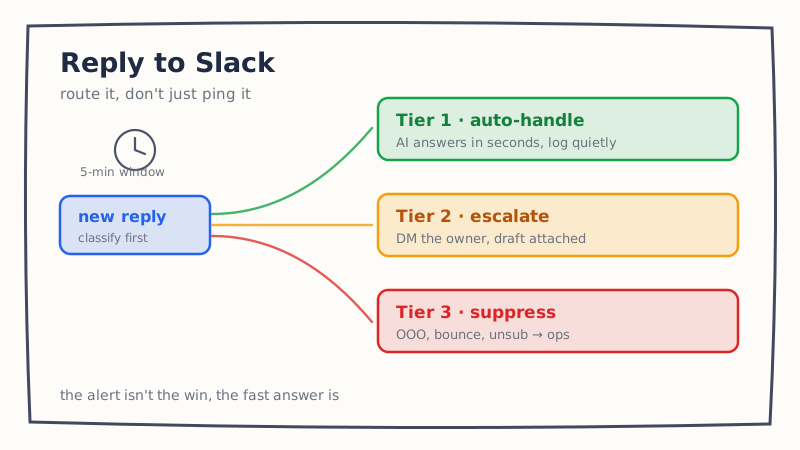
The fix is to stop treating every reply the same. A good workflow classifies the reply first, then decides what Slack should do about it. Think of it in three tiers.
Tier 1: Handle automatically, log quietly
Most inbound replies are not judgment calls. “What does pricing look like?”, “Can you send a case study?”, “Is this a bot?”, “We already use a competitor,” and simple scheduling requests all follow known patterns. These deserve an instant, specific response, but they do not need a human to be pulled out of deep work.
For this tier, an AI reply agent answers within seconds and posts a low-priority, threaded summary to Slack for visibility, not action. The message reads something like: “Auto-handled pricing question from [email protected]. Proposed Tue 10 AM / Wed 2 PM. Thread.” The rep can glance at it later, but nothing is on fire. This is where tools like Underfive do the heavy lifting, drafting and sending the first response the moment a reply lands so the five-minute window is never the bottleneck.
Tier 2: Escalate the hot ones, with an owner
Some replies genuinely need a human, and fast. A named decision-maker asking a specific technical question, a warm referral, a large-account signal, or a reply that explicitly asks for a call with a senior person. These are the replies where a Slack notification earns its keep.
The difference is that the escalation is routed and owned, not broadcast. Instead of dumping it in a shared channel, the workflow tags or direct-messages a specific rep based on territory, account, or round-robin, and includes the context they need: who replied, what they asked, the AI’s suggested response, and a one-click “approve” or “take over.” Deciding what belongs in this tier is exactly the escalation logic we broke down in AI reply agent human escalation rules. Getting those rules right is what keeps Tier 2 rare and high-signal.
Tier 3: Suppress or route to ops
Out-of-office auto-replies, hard bounces, unsubscribe requests, and “wrong person” responses should almost never generate a sales ping. Route them to an ops channel, a suppression list, or your CRM, and keep them out of the reps’ view entirely. Every one of these you filter out is one more reason the team keeps notifications on for the replies that matter.
Classifying replies into these buckets is its own small discipline. If you have not built a triage system yet, the cold email reply categories and triage workflow post lays out the categories to start with.
How to build cold email reply Slack notifications, step by step
Here is the concrete setup, whether you assemble it with a no-code stack or a purpose-built reply agent.
- Capture the reply. Connect your sending platform to your automation layer via native integration or webhook. The trigger is “new inbound reply,” not “email opened” or “link clicked.”
- Classify before you notify. Run the reply through a classifier that assigns a category (pricing, meeting request, objection, referral, out-of-office, unsubscribe, wrong person) and a priority. This step is what separates a useful workflow from a noisy one. A keyword-only classifier will misfire; an AI classifier that reads intent is far more accurate.
- Decide the action per tier. Map each category to a tier. Auto-handle and log, escalate with an owner, or suppress. Write this mapping down so it is a policy, not a vibe.
- Format the Slack message for action. Include the sender, the reply text, the detected category, the AI’s drafted response, and action buttons. A rep should be able to decide in five seconds without leaving Slack.
- Route by owner. Use account ownership, territory, or round-robin to direct Tier 2 escalations to a specific person, and set a fallback so nothing sits unclaimed. If your team already runs lead routing, mirror that logic here.
- Close the loop back to Slack. When a meeting gets booked or a human takes over, update the thread so the channel reflects reality. This keeps the notification history trustworthy instead of a graveyard of stale pings.
If you would rather not stitch this together with Zapier and webhooks, the Underfive Slack integration ships the classification, tiering, and routing as one connected workflow, so the reply is answered and the right person is notified in the same motion.
A realistic example
A prospect replies: “Interesting, but we are already using Outreach for this. What makes you different?” Here is what the tiered workflow does with it.
- The classifier tags it as an objection with a competitor mention, medium-high priority.
- The AI reply agent drafts a specific, non-defensive response that acknowledges Outreach, names one concrete difference, and proposes two meeting times. It does not send yet, because competitor objections are set to Tier 2.
- A Slack DM goes to the account owner: “Competitor objection (Outreach) from [email protected]. Draft ready. Approve to send, or take over.” The draft is attached.
- The rep reads it in 20 seconds, tweaks one sentence, and approves. The response goes out four minutes after the reply landed.
Compare that to the default setup, where the same reply lands in a muted channel and gets answered the next morning with a generic “Happy to show you the difference, grab time here.” The workflow is the difference between a four-minute expert reply and a next-day miss.
Common mistakes to avoid
- Notifying on everything. If out-of-office replies ping the sales channel, you have already lost. Filter first.
- Broadcasting instead of routing. Shared-channel pings with no owner get ignored. Route to a person with a fallback.
- Alerting without a draft. A notification that says “go write a reply” still leaves the slow, hard part to a human. Attach the drafted response so the human is approving, not composing.
- Measuring pings instead of outcomes. The metric that matters is time-to-first-response and reply-to-meeting rate, not how many Slack messages you sent. Track the outcome.
The takeaway
Cold email reply Slack notifications are worth setting up, but only as one piece of a larger workflow. The alert is not the win. The win is a fast, specific response to the replies that matter and silence on the ones that do not. Classify first, auto-handle the routine, escalate the hot ones to a named owner with a draft ready, and suppress the noise.
If your current setup is a single channel that everyone has muted, that is the signal to rebuild it around tiers. You can see how the full reply-handling layer fits together on the Underfive features page, or start by writing down your own three-tier mapping and auditing where your last 20 replies would have landed.