
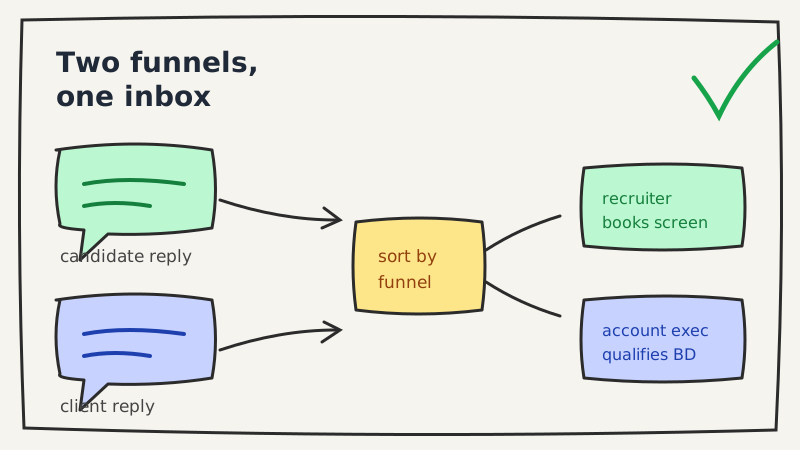
If you run outbound at a recruiting agency, you are not managing one cold email program. You are managing two, and their replies land in the same inbox looking nothing alike.
One side is business development: emails to hiring managers and heads of talent, selling your search capacity. The other side is candidate sourcing: emails to passive talent about a specific role. A “yes” from a VP of Engineering who wants to discuss a retained search and a “yes” from a senior developer curious about a job are both wins, but they need completely different next moves, at different speeds, from different people. Most reply automation treats them as one queue. That is where staffing firms lose placements and burn client relationships.
This is a guide to cold email reply automation for recruiting agencies that respects the two-funnel reality: how to classify, route, and respond to candidate and client replies without letting either one sit.
Why cold email reply automation for recruiting agencies is a two-funnel problem
Almost every cold email guide written for recruiters focuses on the send: how many inboxes to warm, how to segment lists, which subject lines pull. Reply handling gets one line, usually “respond within a couple hours.” That advice is fine for a single funnel. It falls apart when your inbox is fed by two funnels with opposite dynamics.
Consider how the two motions actually differ once a reply lands:
| Candidate funnel | Client / BD funnel | |
|---|---|---|
| Who replies | Passive talent, often employed | Hiring managers, TA leaders, founders |
| Typical intent | Curiosity about a specific role | Evaluating you as a vendor |
| Winning next step | Screening call, role details | Discovery call, terms, active reqs |
| Cost of a slow reply | Candidate cools or accepts elsewhere | Looks unprofessional to a buyer |
| Confidentiality | High (they may be job hunting) | Normal B2B discretion |
| Who should own it | Recruiter / sourcer | Account exec or agency owner |
A reply agent that dumps every response into one “interested” bucket forces a human to re-sort all of it by hand. That defeats the point. The value of automation here is not just speed, it is putting the right reply in front of the right person with the context already attached.
Step 1: Classify by funnel first, then by intent
Standard reply classification sorts messages by intent: interested, not interested, out of office, referral, unsubscribe. For a recruiting agency, intent is the second sort. The first sort is which funnel the reply belongs to, because that determines the entire downstream path.
The cleanest way to get this right is at the campaign level. When you set up outreach, tag each campaign as candidate or client. Every reply inherits that tag, so the automation already knows a “send me details” from a candidate campaign means role specifics, while the same phrase from a BD campaign means your capabilities deck and rate structure. If you have not separated your campaigns this way yet, that is the first fix. It also keeps your candidate messaging out of your client reporting, which matters when you send per-client performance summaries.
Underfive’s AI reply agent reads each reply in the context of the campaign it belongs to, so a positive reply on a candidate sequence and a positive reply on a BD sequence never get handled with the same script. If you want the mechanics of intent sorting in general, our guide on the cold email reply categories and triage workflow breaks down the underlying buckets.
Step 2: Automate the candidate side for speed and warmth
Passive candidates reply because one specific thing caught them: the role, the comp band, the company, the remote policy. They are not committing to a job change. They are opening a door, and doors close fast. A candidate who emails back at 9pm and hears nothing until 11am the next day has had a full evening to reconsider or to reply to the three other recruiters in their inbox.
For candidate replies, the automation should:
- Answer the obvious question immediately. Most first replies ask one of a handful of things: what is the comp, is it remote, which company, why me. A reply agent can answer the non-confidential ones in seconds and move straight to scheduling.
- Offer times, not a back-and-forth. “Are you free to chat?” invites a delay. A concrete set of slots, or a booking link, converts curiosity into a call before it fades.
- Protect confidentiality. Never reveal that a candidate is exploring roles to anyone, and keep client names vague until a screening call when the role requires it. This is a rule you can encode once and trust the agent to hold.
- Escalate the nuanced ones. “I might be interested but only for the right equity” is a recruiter conversation, not a canned answer. The agent should recognize it and hand off with the full thread attached.
The goal is that a candidate who shows interest at any hour gets a warm, specific, human-sounding response before they move on, and a screening call on the calendar without a recruiter touching it manually. Our piece on responding to positive cold email replies covers the tone that keeps an interested reply moving instead of stalling it.
Step 3: Automate the client side for qualification and handoff
The BD funnel is a B2B sale, and the reply dynamics match. Hiring managers and TA leaders are slower, more deliberate, and judging whether you are worth a meeting. Speed still matters, but qualification and a clean handoff matter more than raw velocity.
For client replies, the automation should:
- Qualify before booking. A hiring manager who replies “we might have some roles opening up” is not the same as one who says “we have two open reqs we cannot fill.” The agent can ask the one or two questions that separate a real opportunity from a maybe, so your account exec walks into the call already knowing the shape of the deal.
- Route by account owner. If a named account replies, it should land with the person who owns that relationship, not in a shared pool where it waits. This is where reply routing earns its keep.
- Handle the vendor objections. “We already work with an agency,” “what are your fees,” “send me your terms” are predictable and answerable without a human, up to the point where a real negotiation starts.
- Log to your CRM. Every BD reply is pipeline data. Auto-logging replies to your CRM keeps your pipeline honest without a rep doing data entry after every exchange.
Because a recruiting agency often runs BD across many client-facing inboxes at once, the routing has to hold up at volume. If that is your situation, our guide on managing multiple client inboxes with an AI reply agent goes deeper on keeping accounts separated and owned.
Step 4: Set different speed expectations for each funnel
A single response-time SLA across both funnels is a mistake. The candidate side is a race against attention and competing recruiters, so the target is minutes, especially outside business hours when a passive candidate is actually reading personal email. The client side tolerates a slightly slower, more considered reply, but a BD lead that sits for a day tells a buyer exactly how you will handle their search.
A practical split many agencies land on: respond to candidate replies within minutes at any hour, and to client replies within the hour during business hours with a same-evening acknowledgment after hours. The exact numbers matter less than the principle, which is that “fast” means something different on each side, and your automation should enforce both without a human watching the inbox at midnight.
Step 5: Measure the two funnels separately
If you report candidate and client replies as one number, you are blind to which motion is actually working. Track them apart:
- Candidate funnel: reply rate, reply-to-screen booking rate, and screen-to-submit rate.
- Client funnel: reply rate, reply-to-discovery booking rate, and discovery-to-signed rate.
Recruiting is one of the few B2B verticals where the candidate motion often out-replies the client motion, because passive talent is conditioned to hear about opportunities and a specific role earns a response. If your dashboards blend the two, that signal disappears and you cannot tell whether to feed more volume into sourcing or BD. For the underlying method, our walkthrough on how to calculate cold email reply rate applies cleanly to each funnel on its own.
Where automation stops and recruiters take over
None of this replaces the recruiter or the account exec. Automation should own the parts that are mechanical and time-sensitive: reading intent, answering the predictable questions, booking the obvious calls, routing to the right owner, and logging the exchange. Judgment stays human. The candidate weighing a counteroffer, the client negotiating a contingency fee, the referral that opens a new logo, those are conversations your team should be in, freed up because the agent already cleared the routine 80 percent.
That division is the whole point of reply automation for a staffing firm. You are not trying to take recruiters out of the loop. You are trying to make sure that when a candidate or a client raises their hand, someone, or something, answers before the moment passes.
If you want to see how funnel-aware reply handling works against your own candidate and client sequences, take a look at what Underfive does and point it at one campaign of each type first. Handling both funnels well is less about sending more and more about never letting a raised hand go cold.