Cold Email Reply SLA: How to Set, Staff and Measure Response Time Tiers at Agency Scale
You told a client you reply to their leads fast. You have 14 clients, roughly 1,900 mailboxes, three sequencers and a LinkedIn tool, and if that client asked you today what your 90th percentile time to first response was on positive replies last week, you could not answer. That gap between the promise and the instrumentation is what a cold email reply SLA is supposed to close, and almost nobody in outbound actually runs one.
The SLA guides you will find online were written for customer support desks, where the clock starts when a ticket lands at one shared address and the customer has nowhere else to go. Outbound is the opposite situation on both counts. This is how to build a reply SLA for an outbound reply desk: the tiers by reply class, the three clocks you have to measure, the staffing math that tells you whether your number is achievable, and what to actually put in writing for a client.
What a cold email reply SLA is, and what it is not
A cold email reply SLA is a committed maximum time, measured at a percentile, from the moment a prospect’s reply arrives at your sending mailbox to the moment a substantive first response leaves it, defined separately for each class of reply.
Every clause in that definition exists because teams get it wrong in a specific way.
Committed maximum, measured at a percentile. Averages are useless here and actively dishonest. If 80% of your replies are auto-responders that a filter answers in two seconds, your average time to first response looks world class while the meeting requests sit for six hours. Measure p90, per reply class. The median tells you how the easy cases went. The 90th percentile tells you what your client will eventually quote back to you in a renewal conversation.
From the moment it arrives at the mailbox. Not from when it appeared in your tool. More on this below, because this is where most of the lost time actually hides.
A substantive first response. An acknowledgment that answers nothing is not a response, it is a second touch that teaches the prospect you are a machine with no answers. If the reply asks for pricing, the first response addresses pricing.
Defined per reply class. A single blanket “we reply within one hour” number is the most common mistake. It is simultaneously too slow for a prospect saying “send me a time” and far too expensive to maintain for someone saying “not now, try me in Q3.”
Why support SLA templates break on outbound
Three structural differences, and each one changes the number you should pick.
The prospect is not waiting for you. In support, the customer opened the ticket and will wait, annoyed but present. In outbound, you interrupted them, they answered in a two-minute gap between meetings, and their intent decays from that moment. You are also not the only cold email in their inbox that week. The competitive clock, not a courtesy clock, sets the target.
Your volume spikes are self-inflicted. Support volume arrives when it arrives. Outbound reply volume is a direct function of a send schedule you control. When you launch a new client’s campaign on Tuesday morning, you have scheduled your own SLA breach for Wednesday. That makes reply SLA a capacity planning problem, not just a responsiveness goal.
There is no shared address. A support SLA assumes one queue. Your replies come back to whichever of 1,900 rotating mailboxes sent the original message, across four different tools, which is why an outbound SLA is unmeasurable until the replies are consolidated in one place with one clock.
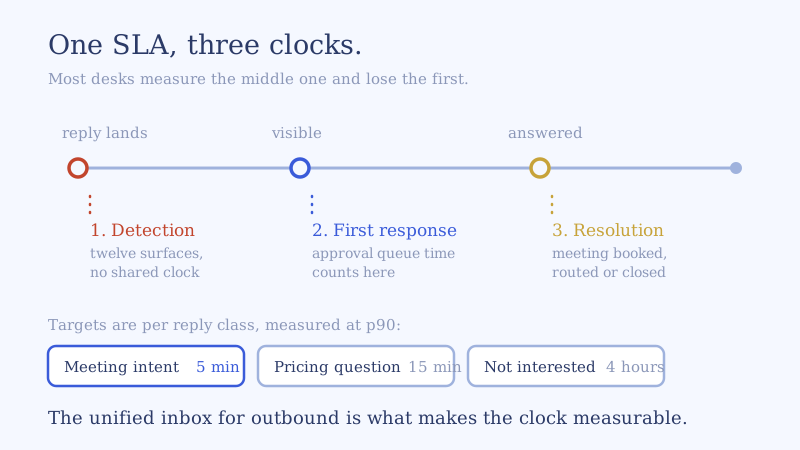
The three clocks in a reply SLA
Most teams measure one clock and lose their time in a different one.
Clock 1: detection. Reply hits the mailbox to reply visible in the surface a human or an agent is actually watching. In a consolidated setup this is seconds. In a fragmented one it is the sum of your worst polling interval, the spam folder a reply landed in, and the number of hours before somebody opened that client’s workspace tab. Detection lag is invisible in every sequencer’s own reporting, because its clock starts at ingestion. If you only ever fix one thing after reading this, make it this clock.
Clock 2: first response. Visible to substantive answer sent. This is the clock everyone means when they say SLA, and it includes two things teams like to exclude but should not: time spent waiting in an approval queue, and time spent waiting on a client to answer a question your inbox manager could not. A draft sitting unapproved for 40 minutes is a 40-minute late reply.
Clock 3: resolution. First response to terminal outcome: meeting on the calendar, routed to the right stakeholder, suppressed, or closed. This is the clock that correlates with revenue, and the one that exposes a desk that answers fast and then abandons the thread. We wrote about that failure mode separately in replies but no meetings, and the pattern is almost always a strong clock 2 with no owner on clock 3.
Instrument all three. Report clock 1 internally and clock 2 and 3 to the client.
Reply SLA tiers by reply class
Here is the tier structure I would run for an agency reply desk. The share-of-volume column is a realistic shape for a mixed book, not a benchmark to adopt, and you should replace it with your own sample of 200 classified replies. If you have not built that taxonomy, start with a reply triage workflow and classify against it.
| Reply class | Typical share | p90 first response | Coverage | Who sends |
|---|---|---|---|---|
| Meeting intent (“send a time”) | 8 to 12% | 5 minutes | 24/7 | Agent autosend with live calendar |
| Pricing or product question | 6 to 10% | 15 min in window, 1 hr outside | 24/7 | Agent draft, auto if client is onboarded |
| Objection (timing, budget, contract) | 10 to 15% | 30 minutes | Coverage window | Agent autosend from playbook |
| Referral or wrong person | 3 to 6% | 1 hour | Coverage window | Agent autosend |
| Negative, not interested | 15 to 25% | 4 business hours | Coverage window | Agent autosend, short and graceful |
| Unsubscribe or legal request | 2 to 5% | 5 minutes to suppress | 24/7 | Automated action, no human |
| Out of office or auto-reply | 30 to 50% | No reply | n/a | Requeue by return date |
| Angry or brand risk | under 1% | 15 minutes | Coverage window | Human only, escalate to account lead |
Four things about this table are worth defending, because they are where operators push back.
Meeting intent gets 5 minutes and 24/7, or the tier is theatre. This is the only class where the cost of being slow is the entire value of the reply. A person who typed “sounds interesting, what does Thursday look like” is at peak intent in that minute. It is also the easiest class to answer correctly, because the answer is a time. If you are going to run one tight tier, run this one, and run it through the night.
Out of office is 30 to 50% of volume and deserves zero human minutes. Every hour your team spends reading auto-replies is an hour unavailable at peak. Parse the return date, pause, requeue. This single automation usually buys back more SLA headroom than any hire.
Negative replies get four hours, not five minutes. Speed buys you nothing here and the reply still matters, because a graceful close is what makes the re-engagement in two quarters possible. Spending peak capacity on it is a staffing error.
Unsubscribe is an action SLA, not a reply SLA. The clock measures time to suppression across every tool and every client workspace, not time to a polite email. Treat a missed suppression as a sev-1 incident, because that is what it is.
Can you actually hold it? The staffing math
An SLA you cannot staff is a liability you have written down. Here is the model, worked with realistic numbers for the 14-client, 1,900-mailbox desk.
Step 1: gross daily replies. At the volumes most agencies run, a book of 1,900 mailboxes produces somewhere around 1,400 replies a day, all classes included. Pull your own number from your sequencers rather than using mine.
Step 2: strip the classes that need no human. Out of office and auto-replies at 40% removes 560. Unsubscribes and pure noise take out another 100. You are left with roughly 740 replies that touch a workflow, of which about 350 need a real answer written by a human or approved by one on day one of a rollout.
Step 3: find your peak, not your average. This is the step everybody skips. Bucket a week of replies by hour of arrival. On a US-weighted book you will typically see something like a third of the day’s volume landing in a three-hour morning window. A third of 350 is roughly 117 conversations in 180 minutes, which is 39 per hour at peak against an all-day average of 25.
Step 4: convert to concurrent capacity. At four minutes of genuine handle time per conversation (read the thread, recall which client and which offer, write, check the calendar), 39 per hour is 156 minutes of work inside every 60-minute peak hour. That is 2.6 people of pure throughput. But a queue running at 100% utilization has unbounded wait times, which is the entire reason your p90 blows out while your average looks fine. To hold a tight p90 you need utilization somewhere around 65%, so 2.6 becomes 4 inbox managers working concurrently during the peak window.
Step 5: multiply by coverage. Four concurrent at peak, plus coverage across a 14-hour window, plus breaks, holidays, sickness and the fact that nobody is fully utilized for eight hours, lands near six to seven inbox managers. And that staffing still returns exactly zero coverage on the meeting-intent tier overnight and at weekends, which is where a meaningful share of your highest-intent replies arrive.
That is the honest arithmetic of a human-only reply desk, and it is why a 5-minute, 24/7 tier is unreachable with headcount at any margin an agency can live with. The companion piece on how many mailboxes one inbox manager can handle works the same model from the capacity side and reaches the same binding constraint.
How to hold a 5-minute tier without hiring
The reason the math fails is that humans are being asked to deliver two different things with one resource: coverage and judgment. Coverage is continuous, unpredictable in timing, and mostly mechanical. Judgment is occasional and expensive. Staffing for coverage means paying judgment rates for mechanical work at 2am.
Splitting those two is what an AI inbox agent does to the staffing model. The agent owns coverage: it reads every reply as it lands, classifies it, and either answers inside the tier or escalates. Your people own judgment: the escalations, the brand-risk threads, the deals where a human relationship is the product.
What that looks like tier by tier, in the order I would deploy it:
- Automate the no-human classes first. Out of office parsing, auto-reply suppression, unsubscribe handling across every tool. Zero brand risk, immediate capacity recovery, and it proves the plumbing before anything customer-facing is at stake.
- Put the meeting-intent tier on autosend with a live calendar. This is the class where the agent is unambiguously better than a person, because it is awake. Booking against real availability turns a 5-minute response into a booked meeting rather than a volley of time proposals.
- Run questions and objections in draft-and-approve for the first two weeks per client. Your inbox manager approves or edits in the queue. You get a review log that becomes the client’s training data and the basis for promoting that class to autosend. Remember that approval latency counts inside clock 2, so staff the queue during the window or the tier fails on a technicality.
- Hard-code the escalation triggers. Legal language, security or compliance review, anything about an existing contract, named executives, visible anger. Escalation rules are the part of the design that earns a client’s trust in autosend, so write them before you turn anything on.
- Measure clock 1 continuously. If detection lag is nonzero after consolidation, your SLA is being eaten before anyone has a chance to answer.
Note that none of this replaces your sequencers. Email Bison, PlusVibe, Smartlead, Instantly, HeyReach and the rest keep sending exactly as they do now. The SLA lives one layer up, in the unified inbox for outbound where every reply from every tool and every client lands on one clock. A sequencer’s own inbox can report its own SLA honestly. It cannot report yours, because it cannot see the other three tools.
Measuring it honestly
An SLA is a measurement discipline before it is a commitment. Five rules:
- Start the clock at the provider timestamp. The time the message hit the mailbox, not the time your system ingested it. Anything else quietly hides clock 1.
- Report p50 and p90, never the mean. And report both per reply class. A single blended number can only mislead.
- Count the approval queue and client-dependency waits. If you exclude them you will optimize the wrong thing, because those are usually the two largest contributors to a blown p90.
- Do not exclude nights and weekends on tiers you sold as 24/7. Report in-window and out-of-window separately, and own the out-of-window number.
- Publish per client, weekly. Per client, per channel, per tier, with volume alongside. An agency that sends this report unprompted is a different vendor than one that does not.
Set your internal target tighter than the client commitment. If you tell a client 15 minutes on positive replies, run a 5-minute internal tier. The gap is your operating headroom for launch days, and it is the difference between a bad week and a breached contract.
What to put in the client agreement
Keep it short, scoped to classes, and explicit about what starts the clock:
Reply handling: positive and meeting-intent replies receive a substantive first response within 15 minutes, measured at the 90th percentile, 24 hours a day. Questions and objections receive a first response within one business hour during coverage hours (7am to 9pm ET, Monday to Friday). Unsubscribe requests are suppressed across all sending tools within 15 minutes. The clock starts when the reply arrives at the sending mailbox. Reported weekly at p50 and p90 by reply class. Threads requiring your product, legal or pricing input are flagged to you and paused from the SLA until you respond.
That last sentence is the one that saves the relationship. Most breaches on questions and objections are not a desk failure, they are a client who took two days to answer a security question. Make that visible in the reporting from day one rather than absorbing it silently and then arguing about it in month four.
A 30-day rollout
Week 1, baseline. Consolidate replies onto one surface so there is one clock. Classify 200 replies by hand. Bucket a week of arrivals by hour. Measure current p50 and p90 by class. Your starting p90 on positive replies will be worse than you expect, and that is the number worth showing your team.
Week 2, set tiers. Build the table above with your own volume shares. Set internal targets tighter than anything you intend to promise. Pick which classes are human-only and write the escalation triggers.
Week 3, automate. No-human classes, then meeting intent on autosend, then questions and objections in draft-and-approve. Staff the approval queue inside the coverage window.
Week 4, publish. Send the first weekly SLA report to one friendly client. Their reaction will tell you whether your tiers are commitments or decorations, and whether you are ready to put the numbers in the next proposal.
A reply SLA is the clearest way an outbound team can prove its work is operationally serious, and it is a genuine commercial differentiator in a market where almost every agency claims fast replies and none of them report a percentile. Build the measurement first, then pick numbers you can defend, then make the desk capable of holding them.
If you want the tiers held across every client and every mailbox without building the desk yourself, Underfive runs both the self-serve agent and a fully managed inbox service for agencies. Bring your own sequencers, keep sending exactly as you do now, and see what a measured 5-minute tier does to your reply-to-meeting rate.