Expandi Reply Management: Running a Multi-Account LinkedIn Reply Desk Across Clients
You are running 40 LinkedIn accounts in Expandi across seven clients, most of those clients also have an email sequencer pushing a few hundred mailboxes, and your inbox manager starts every morning by deciding which window to look at first. Expandi reply management works well inside Expandi, and that sentence contains the entire problem: it is one of four or five places a reply can land, and it is the only one that knows anything about your LinkedIn campaigns.
This is the operator playbook for that desk. What Global Inbox genuinely does, the scoping rule that quietly removes your most valuable conversations from view, why no per-thread assignment means two managers will answer the same prospect, and how to run Expandi as the sending engine while every reply gets worked in one place.
What Expandi’s Global Inbox does, and where reply management stops
Give Expandi credit, because Global Inbox is a real answer to a real problem. Per Expandi’s own description it “brings every campaign conversation from every LinkedIn account in your workspace into a single, sorted view,” which is exactly what you want when you have stopped being able to log into accounts one at a time. It filters on five axes: account, company, status, messages (unread, or awaiting your reply), and interaction (replied, or awaiting follow-up). The per-account inbox adds notes, tags, and contact detail on the lead, and campaign insights sit alongside.
The agency plumbing is thought through too. Access is role based, and the hierarchy matches how agencies actually staff: workspace admins and members see every account, company managers see only the accounts under the companies they own, and LinkedIn account managers see only the accounts assigned to them. There are view-only variants for people who should read but not send. If you manage client LinkedIn presence, that permission model is genuinely useful, and it is more thought than most sequencers give the problem.
So the gap is not inbox quality. It is three boundaries that Expandi draws correctly for its own product and that your reply desk has to live outside of.
The Expandi reply management rule most agencies find out the hard way
Here is the one to internalize before you build any process on top of Global Inbox. In Expandi’s words, “Global Inbox shows leads who are part of active Expandi campaigns.”
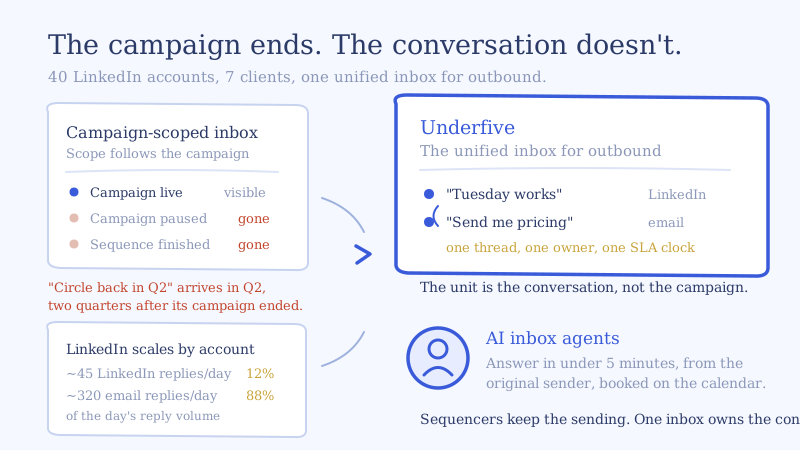
That is a deliberate and defensible design choice. It keeps the view fast and keeps a decade of unrelated LinkedIn chatter out of a campaign tool. But read it as an operator and the consequence is sharp: the scope of your inbox is tied to the lifecycle of your campaigns, not to the lifecycle of your conversations.
Those two things come apart constantly in outbound:
- A campaign finishes its sequence and you archive or pause it. The prospect who replies four days later is replying to a campaign that is no longer active.
- A client pauses spend for a month. Every warm conversation from that client’s last campaign goes quiet in your working view at exactly the moment you should be nurturing it.
- You end a campaign early because the list underperformed. The three good replies it did produce leave with it.
- Someone says “not now, circle back in Q2.” Q2 arrives. That thread is not sitting in a queue waiting for you, because the campaign that produced it ended two quarters ago.
The pattern is consistent and it is the expensive one. Late replies and deferred replies are disproportionately the valuable ones, because the prospect who answers after the sequence has stopped pushing is answering because they want to, not because a follow-up prompted them. A campaign-scoped inbox is structurally worst at holding exactly the conversations worth the most. We wrote about the deferred case in detail in how AI reply agents handle “not right now, circle back later” replies, and the prerequisite for any of it is that the thread still exists somewhere your team actually looks.
The fix is not to leave dead campaigns running forever to keep their inboxes alive. That distorts your reporting and your limits. The fix is to let the conversation live in a layer that has no campaign concept at all.
Why there is no per-thread owner, and what collides because of it
Global Inbox scopes visibility by role, which is a different thing from assigning a conversation to a person. A company manager sees every thread across that client’s accounts. So does every other company manager on that client. Two inbox managers covering the same book both see the same unanswered reply, both see it is unanswered, and nothing in the view tells either of them that the other is typing.
At low volume this never bites. At 40 accounts it bites weekly, and the failure is not cosmetic. A prospect who gets two different answers to one question, in two slightly different voices, from the same company, has learned something about you that no sequence can unlearn. The reply that follows is usually silence.
What a reply desk needs on top of visibility:
- One owner per conversation, set at the moment the reply arrives, not negotiated in Slack.
- Collision detection, so a second person opening the thread sees it is being handled.
- Status that is distinct from read state. “Read” is not “answered,” and “answered” is not “resolved.” Inbox managers working off unread counts will mark things read while triaging and lose them.
- An SLA clock per thread, because the number that predicts whether a reply becomes a meeting is time to first response, not replies handled per day. Our breakdown of why five minute response times change conversion is the reasoning behind making that clock the thing you manage.
Why LinkedIn reply volume behaves differently than email
The third boundary is channel, and it matters more than “we also do email” suggests, because the two channels produce reply load with completely different shapes.
Email scales by mailbox, and mailboxes are cheap to add. If a client wants more volume you provision more mailboxes and the reply curve rises smoothly. LinkedIn scales by account, accounts are expensive and slow to warm, and the safe ceiling per account is low. Expandi’s own safe-limit guidance sits in the range of roughly 20 to 30 connection requests per day per account, and that ceiling is not a setting you can buy your way past.
Run the arithmetic on a 40 account book, using your own numbers in place of these:
- 40 accounts at 25 connection requests per day is 1,000 requests per day.
- At a 30% acceptance rate, 300 new connections per day enter messaging.
- If 15% of those connections eventually reply, that is about 45 LinkedIn replies per day.
- The same clients’ 400 email mailboxes at 20 sends per day is 8,000 emails per day. At a 4% reply rate that is 320 email replies per day.
So LinkedIn is roughly 12% of the reply volume and close to 100% of the care, because each LinkedIn conversation sits under a named human’s face, on an account you spent weeks warming, and a bad answer there costs an asset rather than a mailbox. Meanwhile 88% of the volume is somewhere your LinkedIn inbox cannot see, and the prospect is frequently the same person on both.
That last point is the one that breaks the two-window workflow. When the same prospect is mid-sequence in email and has just replied on LinkedIn, the right next action depends on information neither tool has in one place. Lead data syncs between tools. Replies do not. We laid out the ownership rules for that situation in the unified inbox playbook for LinkedIn and email.
Wiring Expandi reply management into a unified inbox
The goal is not to move sending. Expandi is good at safe multi-account LinkedIn sending, and that is where it should stay. The goal is to stop the inbox from being the thing that scales with your account count. Here is the sequence we run with agencies.
Step 1: Map one Expandi company to one client space
Expandi’s company grouping is already your client boundary. Mirror it exactly, one client space per company, rather than merging clients into one queue and filtering later. Filtering is a habit and habits fail at 7am. Structure does not. This also keeps per-client SLA reporting honest, which is the thing you will be asked about on the monthly call.
Step 2: Connect accounts, then deliberately set who can send
Bring each LinkedIn account in, then set send rights before launch, not after. The useful default: every inbox manager can read across their assigned client, a named owner can send, and junior staff get draft rights only. Expandi’s role model already supports read-only staff, so mirror that intent in the reply layer rather than contradicting it.
Step 3: Subscribe to every reply on the thread, not just the first
The single most common misconfiguration. Teams wire up the first reply and assume the conversation is covered, then a prospect’s second message, the one that says “Tuesday works,” never raises anything. Subscribe to every inbound message for the life of the thread, and treat a reply on a finished campaign as a first class event rather than an edge case.
Step 4: Break the campaign-to-conversation link
This is the step that earns the whole project. Once replies land in an inbox with no campaign concept, a conversation stays open because the human has not finished talking, which is the only correct reason. Pause a campaign, archive it, end a client’s spend for a quarter, and the threads stay exactly where your team works. A unified inbox for outbound is defined by this property more than by any feature list: its unit is the conversation, not the campaign.
Step 5: Keep Expandi’s tags, add a routing layer above them
Expandi’s tags and notes are campaign context and they are worth preserving. What they are not is a routing system, because they describe the lead rather than deciding what happens next. Add a classification layer on top: positive, question, objection, referral, wrong person, out of office, unsubscribe. Route on the classification, report on the tags.
Step 6: Let agents answer the easy categories and hold the rest
In a typical day’s 45 LinkedIn replies and 320 email replies, the large majority are patterns you have answered hundreds of times. Scheduling back and forth, “what does it cost,” “send me more info,” “I’m not the right person.” AI inbox agents read each reply, answer in under five minutes in the sender’s voice, and book straight onto the client’s calendar. Keep humans on the categories where judgment pays: pricing negotiation, anything legal or security related, and any thread where the account itself is at risk. Where to draw that line is worth doing explicitly, and our human escalation rules post is the framework we use.
On LinkedIn specifically, hold the bar higher than you would on email. The register is shorter and more personal, the sender is a real person with a real profile, and an answer that reads like a template does more damage per message than it would in an email thread.
Step 7: Answer from the original sender, and pause the other channel
Reply from the account that sent the original message, always. The prospect connected with a person, and a reply from a different name reads as a bot or a bait and switch. Then, when a reply is positive on either channel, pause the other channel’s sequence for that prospect. Nothing undoes goodwill faster than a scheduled email follow-up landing twenty minutes after the prospect agreed to a meeting on LinkedIn.
The four numbers an Expandi reply desk runs on
Track these per client, weekly. Everything else is decoration.
- Time to first response, median and 90th percentile. The median tells you if the system works. The 90th tells you where it fails, and the 90th is where your lost deals are.
- Reply to meeting rate, split by channel. LinkedIn and email convert differently. A blended number hides which channel is worth more accounts.
- Threads with no owner for more than an hour. Should be zero. Any number above zero is a staffing or routing bug, not an individual’s mistake.
- Replies arriving on finished campaigns. The number that proves the point. Most teams measuring this for the first time are surprised by it, and it is pure recovered pipeline.
Where to start
Pick your highest-volume client, mirror its Expandi company into one client space, subscribe to every reply on the thread, and run it in parallel for two weeks with your existing process. The comparison you are looking for is not how the inbox feels. It is your 90th percentile response time and the count of replies that arrived on campaigns that were no longer active.
Keep Expandi doing what it does well, which is safe multi-account LinkedIn sending at a ceiling you cannot buy past. Put the converting somewhere that scales with conversations instead of accounts. The Expandi integration page covers the connection itself, and if you would rather hand the desk over entirely, the managed inbox service for agencies staffs it with our team on your clients’ accounts.